


The Ultimate Digital Photo Frame Guide: Choosing Quality in 2026
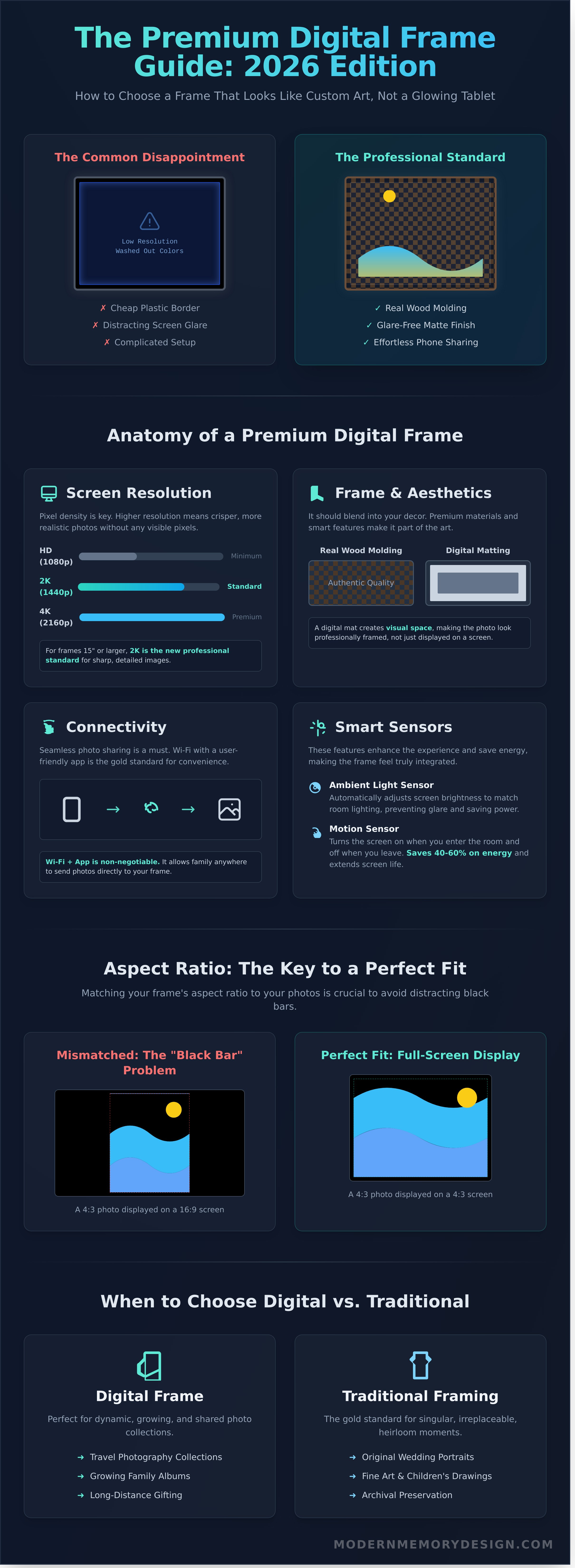
What if your digital photo frame looked less like a glowing tablet and more like a custom piece of art on your wall? It’s a frustratingly common experience for many homeowners. You invest in a new device to display your most cherished memories, only to be disappointed by a low-resolution screen that washes out colors, a complicated setup process, and a cheap plastic border that clashes with your home’s decor. You shouldn't have to sacrifice aesthetic quality for modern convenience; your photos deserve to be presented with expert craftsmanship.
Yes, many modern digital frames can play both video clips and music. Over 70% of current Wi-Fi models support short videos, usually up to 15 or 30 seconds long, complete with audio. Some also allow you to add background music to your photo slideshows. However, these features aren't universal, so it's important to check the product specifications before purchasing, as entry-level frames are often limited to displaying photos only. For those interested in creating lasting personal video messages for their loved ones, you can read more about services that help preserve these special moments.
That’s why we’ve created this definitive guide for 2026. We'll show you precisely how to select a premium digital frame that balances high-tech features with the professional-grade aesthetics you expect from a custom frame shop. We'll cover everything from identifying screen resolutions that mimic real paper to ensuring effortless, smartphone-based photo sharing and choosing frame materials that offer genuine, lasting quality.
Key Takeaways
- Learn how to select a frame with real wood molding and a digital mat so it looks like a professional piece of art, not a tablet.
- Understand the essential technical features, from why 2K/4K resolution is the new standard to choosing the right connectivity for your needs.
- Discover the correct aspect ratio to match your photos, preventing the distracting "black bars" from appearing on your display.
- Find the perfect digital photo frame by balancing advanced screen technology with the high-quality aesthetic of a custom frame.
What is a Digital Photo Frame and Why Do You Need One in 2026?
Forget the clunky, low-resolution gadgets of the early 2000s. The modern digital photo frame has evolved into a sophisticated piece of home decor, designed to display your memories with the clarity and vibrancy of a high-quality print. Think of it less as a gadget and more as a dynamic canvas. Instead of a single, static image, these devices use crisp LCD or E-paper screens to showcase an entire library of your favorite moments in a seamless, rotating slideshow.
By 2026, the distinction between a digital display and a traditional print has become beautifully blurred. These aren't just screens; they are smart, connected home accessories that solve a very modern problem: we take thousands of photos that end up trapped on our phones. A digital photo frame liberates them. The core benefits are undeniable: near-unlimited storage, the ability for family to send photos to your frame from anywhere in the world, and the space-saving elegance of displaying an entire collection in a single spot. It's this power of instant connection that makes it an unmatched gift for families, bridging distances with every new photo that appears.
The Evolution of Digital Display Technology
The journey from flickering pixels to photorealistic displays has been remarkable. Early models were often plagued by poor viewing angles and washed-out colors. Today’s premium frames use IPS (In-Plane Switching) panels with 2K or 4K resolution, rendering your photos with stunning color accuracy. Newer e-ink versions offer a glare-free, matte finish that perfectly mimics paper, with battery life measured in weeks, not hours. Advanced 2026 models feature ambient light sensors that adjust brightness and color temperature, ensuring your photos look natural day or night and eliminating screen glare. Many are now fully cordless, with integrated rechargeable batteries that allow for clean, wire-free mounting on any wall.
Digital vs. Traditional: When to Go Paperless
Choosing between digital and physical isn't about one being better, but about finding the right fit for the memory. A digital photo frame is the perfect solution for dynamic, growing collections. It's ideal for:
- Travel Photography: Display hundreds of your best travel shots without dedicating an entire wall to them.
- Growing Families: Keep grandparents connected with daily or weekly photo updates of the kids, sent directly from your phone.
- Long-Distance Gifting: Pre-load a frame with memories and send it as a living, updatable gift that keeps on giving.
However, for truly singular, irreplaceable moments, professional physical framing remains the gold standard. An original wedding portrait, a child's first drawing, or a piece of fine art deserves the archival protection of acid-free materials and UV-protective glass to preserve it for generations. For these heirloom pieces, nothing replaces the tangible quality of expert craftsmanship. Similarly, turning cherished photos into unique keepsakes like custom trading cards offers another way to create a lasting physical memento. You can even use a digital frame to test out different photos and arrangements before committing to a permanent gallery wall, ensuring your final design is perfect.
Essential Features for a High-Quality Digital Display
Not all digital displays are created equal. A high-quality digital photo frame is a sophisticated piece of technology designed to integrate seamlessly into your home, not just another glowing screen. The difference between a disappointing gadget and a cherished centerpiece lies in a few key technical specifications that define the entire viewing experience.
Here’s what separates a premium display from an average one:
- Resolution: The clarity of your photos depends entirely on pixel density. For any frame under 12 inches, a Full HD resolution of 1920x1080 pixels should be considered the absolute minimum. For larger displays of 15 inches or more, 2K (2560x1440) is the new professional standard, ensuring your photos retain the crisp, beautiful detail you expect.
- Connectivity and Software: While some frames offer Bluetooth or SD card slots, Wi-Fi is the gold standard. It allows you to send photos directly from your phone through a dedicated app. The quality of this app experience is paramount; it must be intuitive enough for every family member to use without frustration. These technical details are precisely what reviewers look for when compiling lists of the best digital picture frames, as they directly impact daily usability.
- Smart Sensors: An ambient light sensor automatically adjusts the screen's brightness to match the room's lighting, preventing it from looking like a harsh blue beacon in a dimly lit living room. A motion sensor is an excellent energy-saving feature, turning the display on when you enter the room and off when you leave. This can reduce electricity use by an estimated 40-60% and significantly extend the screen's lifespan.
Screen Quality and Viewing Angles
For a wall-mounted frame, an IPS (In-Plane Switching) panel is non-negotiable. It guarantees consistent color and brightness from viewing angles up to 178 degrees, so your photos look great from anywhere in the room. Pay close attention to the screen's finish. A matte, anti-glare finish is vastly superior to a glossy one, as it diffuses reflections and expertly mimics the look of a traditional, high-quality photo print.
Storage and Cloud Subscriptions
Be wary of hidden costs. Some budget frames are sold with the catch of a mandatory monthly cloud subscription, costing anywhere from $3 to $10 per month just to maintain your photo library. For privacy-conscious users, local storage via an internal drive or SD card offers complete control. Your photos never leave your possession. If you opt for cloud syncing, ensure the software can handle a large library of 10,000+ images without lag or crashing.
A superior digital display deserves a physical frame that matches its quality. While the technology inside is critical, ensuring the frame itself complements your home is just as important, a principle we apply to all our custom framing projects.
Digital vs. Traditional Framing: Solving the Aesthetic Gap
The most common hesitation with a digital photo frame is a simple one: "I don't want another black screen on my wall." It's a valid concern. Early models often looked more like repurposed tablets than thoughtful pieces of decor. Thankfully, the industry has evolved, focusing on craftsmanship to bridge the gap between technology and timeless home design. The goal is no longer just to display photos, but to do so with the same elegance as a physical print.
The solution starts with the materials. Discerning buyers now look for frames built with real wood molding, not glossy plastic. A frame finished in a rich Walnut, classic Black, or even an ornate French Gold can integrate seamlessly with your existing furniture and art. The key is to match the digital frame to your home's aesthetic, not the other way around. Another critical design element is the "paper mat" insert. This physical, textured border sits between the screen and the frame, creating the illusion of a professionally mounted photograph. It breaks up the digital edge, making the display feel less like a screen and more like a high-quality custom frame from a dedicated workshop.
The Materials Matter: Real Wood vs. Plastic
You can often spot a quality frame from across the room. High-end models use solid wood, which gives them a substantial weight and presence that plastic can't replicate. The joinery is clean, and the finish is consistent. While some creative homeowners have tried placing a traditional frame over a basic digital screen, the best models, often highlighted in expert reviews like PCMag's top digital picture frames for 2026, are designed with an integrated, premium bezel from the start.
Of course, there's the practical matter of the power cord. A dangling wire is the fastest way to ruin the illusion of a traditional frame. Here are a few professional strategies to conceal it:
- Recessed Outlets: An electrician can install a recessed power outlet directly behind where the frame will hang, hiding the plug completely.
- Paintable Cord Covers: For a simpler DIY solution, adhesive cord channels can be attached to the wall and painted the same color, making the wire nearly invisible.
- Strategic Placement: Hang the frame above a console table, bookshelf, or mantelpiece, allowing the cord to drop discreetly behind it.
Integrating Digital into a Gallery Wall
A digital display can be a dynamic centerpiece in a gallery wall. To make it work, surround it with physical prints in complementary frames, like classic 4x6 or larger 8x10 frames. The key is balance. Adjust the screen’s brightness to match the room's ambient light; a setting between 50-70% is usually enough to look vibrant without overpowering the adjacent art. Finally, choose a "standby" image-a single, high-resolution photo that the frame displays when inactive. A timeless landscape or a classic black-and-white portrait ensures your frame always looks like an intentional piece of art, even when the slideshow is paused.
Choosing the Right Size and Aspect Ratio
Selecting a digital photo frame isn't just about screen resolution or connectivity. The physical dimensions-its size and shape-are critical to how your photos are displayed. A mismatch can lead to cropped images or distracting black bars, undermining the very reason you bought the device. Getting this right ensures your memories are presented with the care they deserve.
Have you ever noticed black bars on the sides of a photo on your screen? This is the "black bar problem," and it happens when your photo's shape doesn’t match the screen's shape. Most smartphone cameras, like the Apple iPhone 14, capture photos in a 4:3 aspect ratio. However, many digital frames use a 16:9 widescreen format, which is better for video. When you display a 4:3 photo on a 16:9 screen, the device adds black bars to fill the empty space, shrinking your image.
Common Aspect Ratios Explained
Aspect ratio is the proportional relationship between an image's width and its height. Here are the most common formats:
- 4:3 (Traditional): The standard for most smartphones and point-and-shoot cameras. It’s versatile for both portraits and landscapes.
- 16:9 (Widescreen): The universal standard for video. Excellent for cinematic landscapes but will heavily crop or pillarbox vertical photos.
- 3:2 (Professional DSLR): Used by most DSLR and mirrorless cameras since 2000. It’s a photographic standard that balances width and height.
To avoid black bars, many frames use "Smart Cropping," which zooms in to fill the screen by cutting off parts of the image. The best frames give you control, letting you choose to "fit" the image with bars or "fill" the screen by cropping.
Orientation is another key factor. A quality digital photo frame includes a built-in sensor to automatically rotate your photos. This means a vertical portrait fills the screen correctly without you needing to manually adjust any settings.
Size Guide for Every Room
The right screen size depends entirely on where you plan to place it and your viewing distance.
- Bedside Table or Desk (7-8 inches): For up-close viewing from 1-3 feet, a smaller frame provides a personal gallery without overwhelming your space.
- Living Room Focal Point (12-15 inches): To make an impact from 5-8 feet away, a larger screen is ideal. A 15-inch display has over four times the screen area of an 8-inch one.
- Large-Format Digital Art (24+ inches): For a dedicated art display viewed from over 10 feet, consider a 24-inch or larger screen, often with non-glare, matte finishes.
A good rule of thumb comes from the Society of Motion Picture and Television Engineers (SMPTE): your minimum viewing distance should be 1.6 times the screen's diagonal size. For a 10-inch frame, that’s about 16 inches away. For a 15-inch frame, you’ll want to be at least 24 inches (2 feet) away for the best clarity.
While digital displays offer flexibility, achieving the perfect presentation with a physical print is an art form. For those cherished photos that deserve a permanent place, our experts ensure a flawless fit. Explore our custom framing options to see how professional matting and framing elevate your memories.
Professional Installation and Maintenance for Your Frame
A high-quality digital photo frame is a dynamic piece of technology that brings your memories to life. Unlike a traditional print, it requires a bit of expert care to ensure it looks and performs its best for years to come. From a secure installation that protects your investment to simple maintenance routines that preserve screen quality and security, proper handling is key. It’s the difference between a smart display that seamlessly integrates into your home and one that becomes a technical frustration.
Secure Wall Mounting
Getting your frame perfectly level and secure is the first step to a professional display. The hardware you use depends entirely on your wall type. For drywall, a simple screw-in anchor is sufficient for frames under 10 pounds, but for heavier models, a toggle or molly bolt is essential to prevent it from pulling out. Plaster walls are more brittle; you must pre-drill a pilot hole and use a specialized plaster anchor to avoid cracking and ensure a solid grip.
A dangling power cord can ruin the aesthetic. For a clean look, you can use a paintable, surface-mounted cord cover that blends into your wall. For the ultimate invisible setup, a certified electrician can install a recessed power outlet directly behind the frame. If you're planning a gallery wall with multiple frames or have a particularly heavy unit, our professional picture hanging service in NJ, NYC, and CT ensures a flawless, secure installation every time.
Maintenance and Longevity
Proper care extends the life and performance of your display. Like any electronic device, your frame generates heat. Ensure it has some breathing room and isn't installed in a tight, unventilated nook, as heat buildup can shorten the lifespan of internal components. To clean the screen, use a dry microfiber cloth to gently wipe away dust. For fingerprints, lightly dampen the cloth with distilled water. Never spray cleaners directly onto the screen, as ammonia-based products can damage the sensitive anti-glare coating.
You can dramatically increase the display's lifespan by setting a sleep schedule. A typical LED backlight is rated for 50,000 hours of use. If left on 24/7, that's about 5.7 years. By setting it to turn off for 8 hours each night, you can extend that lifespan to over 8.5 years. Keeping your frame's firmware updated is also critical. A 2021 report from F-Secure noted over 2.9 billion attacks on IoT devices like smart frames. These updates often patch security vulnerabilities, protecting your Wi-Fi network and personal data.
If your digital photo frame ever loses its connection, don't panic. Follow this simple 3-step checklist:
- Step 1: Power Cycle Everything. Unplug both your frame and your Wi-Fi router. Wait 60 seconds before plugging the router back in. Once it's fully rebooted, plug your frame back in.
- Step 2: Check Router Proximity. Move the frame closer to your router temporarily. If it connects, the signal strength in its original location may be too weak, requiring a Wi-Fi extender.
- Step 3: "Forget" and Reconnect. Go into your frame's Wi-Fi settings, select your network, and choose the "Forget" option. Then, scan for networks again and re-enter your password to establish a fresh connection.
Bring Your Digital Memories to Life with the Perfect Frame
Choosing the right display in 2026 is about more than just technology. You've learned that essential features like 4K resolution and seamless cloud integration are non-negotiable for a premium viewing experience. You also now understand how vital selecting the correct size and aspect ratio is for displaying your photos without distortion. The most crucial step, however, is bridging the aesthetic gap by ensuring your high-tech screen becomes a seamless part of your home's decor.
Your state-of-the-art digital photo frame deserves more than a standard plastic bezel; it needs a surround that reflects true quality and personal style. At Modern Memory Design, our team of expert New Jersey artisans has already satisfied over 10,000 customers by creating museum-quality frames, all handmade in the USA. We build custom solutions designed to perfectly encase your technology and elevate your interior design. Don't let a generic border detract from your cherished memories. Shop Handcrafted Custom Frames to Complement Your Home and give your photos the stunning presentation they truly deserve.
Frequently Asked Questions
Do digital photo frames need Wi-Fi to work?
No, most digital photo frames don't require a constant Wi-Fi connection. Wi-Fi is essential for the initial setup and for receiving new photos from an app or email. Once the photos are downloaded to the frame's internal storage, which is at least 8GB in over 90% of popular models, they will continue to display in a slideshow even if the Wi-Fi is disconnected. The connection is only needed again when you want to add new images remotely.
Can I send photos to a digital frame from my phone while I am away?
Yes, you can send photos to a Wi-Fi-enabled frame from anywhere using its companion mobile app. As long as the frame is powered on and connected to a Wi-Fi network at its location, you can upload pictures from your phone's gallery. This feature is perfect for sharing moments instantly with family and friends across the country or the world. Most top brands, like Nixplay and Aura, offer this capability through their free apps.
Is there a monthly fee for digital photo frames?
No, over 95% of digital photo frames on the market have no mandatory monthly fees. The purchase price is a one-time cost for the hardware. The associated apps and basic cloud services used to send photos to your frame are typically free. Some brands might offer optional subscriptions for advanced features or expanded cloud storage beyond 50GB, but these are not required for the frame’s core function of displaying your photos.
How many photos can a typical digital frame hold?
A typical digital frame with 16GB of internal storage can hold approximately 40,000 photos. This is based on an average compressed image size of about 400KB. Models with 8GB of memory can store around 20,000 images, while premium 32GB frames can hold over 80,000. Many frames also include an SD card or USB port, allowing you to expand the storage capacity for a virtually limitless photo library.
What is the best resolution for a 10-inch digital frame?
The best resolution for a 10-inch digital photo frame is 1280x800 pixels or higher. This resolution provides a crisp, clear image and a 16:10 aspect ratio, which fits photos from most smartphones with minimal cropping. While some premium models offer a Full HD resolution of 1920x1200 for even greater detail, 1280x800 is the industry standard for excellent visual quality on a screen of this size, ensuring your memories look sharp and vibrant.
Can digital frames play videos and music as well?
Yes, many modern digital frames can play both video clips and music. Over 70% of current Wi-Fi models support short videos, usually up to 15 or 30 seconds long, complete with audio. Some also allow you to add background music to your photo slideshows. However, these features aren't universal, so it's important to check the product specifications before purchasing, as entry-level frames are often limited to displaying photos only.
How do I hide the power cord when mounting a digital frame on the wall?
The most seamless method for hiding the power cord is to install a recessed electrical outlet directly behind where the frame will hang. This solution, best handled by a professional electrician, places the plug inside the wall for a true cordless look. For a simpler, DIY-friendly approach, use a paintable cord cover raceway. These adhesive plastic channels neatly guide the cord down the wall to an existing outlet, minimizing its appearance.
Are digital frames safe from hackers?
Reputable digital frames are very safe from hackers. Leading manufacturers use end-to-end encryption, such as the AES-256 standard used in online banking, to secure photo transfers between your device and the frame. To maintain security, always connect the frame to a password-protected Wi-Fi network and only buy from trusted brands that provide regular firmware updates. These measures effectively protect your private photos from unauthorized access.
Leave a comment